import React, { Component } from "react";

class ClassInput extends Component {
  constructor(props) {
    super(props);

    this.state = {
      todos: [],
      inputVal: "",
    };

    this.handleInputChange = this.handleInputChange.bind(this);
    this.handleSubmit = this.handleSubmit.bind(this);
  }

  handleInputChange(e) {
    this.setState((state) => ({
      ...state,
      inputVal: e.target.value,
    }));
  }

  handleSubmit(e) {
    e.preventDefault();
    this.setState((state) => ({
      todos: state.todos.concat(state.inputVal),
      inputVal: "",
    }));
  }

  render() {
    return (
      <section>
        <h3>{this.props.name}</h3>
        <form onSubmit={this.handleSubmit}>
          <label htmlFor="task-entry">Enter a task: </label>
          <input
            type="text"
            name="task-entry"
            value={this.state.inputVal}
            onChange={this.handleInputChange}
          />
          <button type="submit">Submit</button>
        </form>
        <h4>All the tasks!</h4>
        <ul>
          {this.state.todos.map((todo) => (
            <li key={todo}>{todo}</li>
          ))}
        </ul>
      </section>
    );
  }
}

export default ClassInput;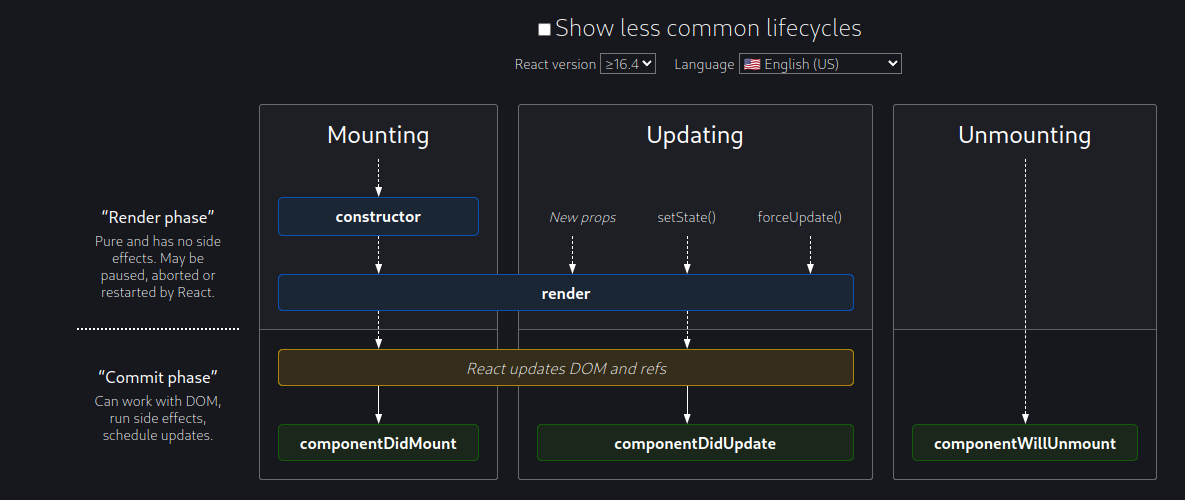
LIfecycle methods https://legacy.reactjs.org/docs/react-component.html#the-component-lifecycle
defaultProps can be defined as a property on the component class itself, to set the default props for the class. This is used for undefined props, but not for null props. For example:
class CustomButton extends React.Component {
  // ...
}

CustomButton.defaultProps = {
  color: 'blue'
};