function MyButton() {
  return (
    <button>
      I'm a button
    </button>
  );
}

export default function MyApp() {
  return (
    <div>
      <h1>Welcome to my app</h1>
      <MyButton />
    </div>
  );
}
const user = {
  name: 'Hedy Lamarr',
  imageUrl: 'https://i.imgur.com/yXOvdOSs.jpg',
  imageSize: 90,
};

export default function Profile() {
  return (
    <>
      <h1>{user.name}</h1>
      <img
        className="avatar"
        src={user.imageUrl}
        alt={'Photo of ' + user.name}
        style={{
          width: user.imageSize,
          height: user.imageSize
        }}
      />
    </>
  );
}
import React from 'react';

function App() {
  return <div className="App">Hello World!</div>;
}

// OR (arrow-function syntax)

const App = () => {
  return <div className="App">Hello World!</div>;
};

// OR (implicit return)

const App = () => <div className="App">Hello World!</div>;

export default App;
reportWebVitals(function)
props
import React, { Component } from 'react';

class MyComponent extends Component {
  constructor(props) {
    super(props);
  }

  render() {
    return (
      <div>
        <h1>{this.props.title}</h1>
        <button onClick={this.props.onButtonClicked}>Click Me!</button>
      </div>
    );
  }
}

export default MyComponent;
// App.js
import React, { Component } from 'react';
import MyComponent from './MyComponent';
class App extends Component {
constructor(props) {
super(props);
this.onClickBtn = this.onClickBtn.bind(this);
}
onClickBtn() {
console.log('Button has been clicked!');
}
render() {
return (
<div>
<MyComponent title="React" onButtonClicked={this.onClickBtn} />
</div>
);
}
}
export default App;state
import React, { Component } from 'react';

class App extends Component {
  constructor() {
    super();

    this.state = {
      count: 0,
    };

    this.countUp = this.countUp.bind(this);
  }

  countUp() {
    this.setState({
      count: this.state.count + 1,
    });
  }

  render() {
    return (
      <div>
        <button onClick={this.countUp}>Click Me!</button>
        <p>{this.state.count}</p>
      </div>
    );
  }
}
props and state in functional components
// MyComponent.js

import React from 'react';

function MyComponent(props) {
  return <div>{props.title}</div>;
}

export default MyComponent;
// App.js
import React from 'react';
import MyComponent from './MyComponent';
function App() {
return (
<div>
<MyComponent title="Hello World" />
</div>
);
}
export default App;import { getImageUrl } from './utils.js';
function Avatar({ person, size }) {
return (
<img
className="avatar"
src={getImageUrl(person)}
alt={person.name}
width={size}
height={size}
/>
);
}
export default function Profile() {
return (
<div>
<Avatar
size={100}
person={{
name: 'Katsuko Saruhashi',
imageId: 'YfeOqp2'
}}
/>
<Avatar
size={80}
person={{
name: 'Aklilu Lemma',
imageId: 'OKS67lh'
}}
/>
<Avatar
size={50}
person={{
name: 'Lin Lanying',
imageId: '1bX5QH6'
}}
/>
</div>
);
}
- To pass props, add them to the JSX, just like you would with HTML attributes.
- To read props, use the
function Avatar({ person, size })destructuring syntax. - You can specify a default value like
size = 100, which is used for missing andundefinedprops. - You can forward all props with
<Avatar {...props} />JSX spread syntax, but don’t overuse it! - Nested JSX like
<Card><Avatar /></Card>will appear asCardcomponent’schildrenprop. - Props are read-only snapshots in time: every render receives a new version of props.
- You can’t change props. When you need interactivity, you’ll need to set state.
https://react.dev/learn/responding-to-events
- You can handle events by passing a function as a prop to an element like
<button>. - Event handlers must be passed, not called!
onClick={handleClick}, notonClick={handleClick()}. - You can define an event handler function separately or inline.
- Event handlers are defined inside a component, so they can access props.
- You can declare an event handler in a parent and pass it as a prop to a child.
- You can define your own event handler props with application-specific names.
- Events propagate upwards. Call
e.stopPropagation()on the first argument to prevent that. - Events may have unwanted default browser behavior. Call
e.preventDefault()to prevent that. - Explicitly calling an event handler prop from a child handler is a good alternative to propagation.
https://react.dev/learn/conditional-rendering
return (

<li className="item">

{isPacked ? name + ' ✔' : name}

</li>

);
return (

<li className="item">

{name} {isPacked && '✔'}

</li>

);- In React, you control branching logic with JavaScript.
- You can return a JSX expression conditionally with an
ifstatement. - You can conditionally save some JSX to a variable and then include it inside other JSX by using the curly braces.
- In JSX,
{cond ? <A /> : <B />}means “ifcond, render<A />, otherwise<B />”. - In JSX,
{cond && <A />}means “ifcond, render<A />, otherwise nothing”. - The shortcuts are common, but you don’t have to use them if you prefer plain
if.
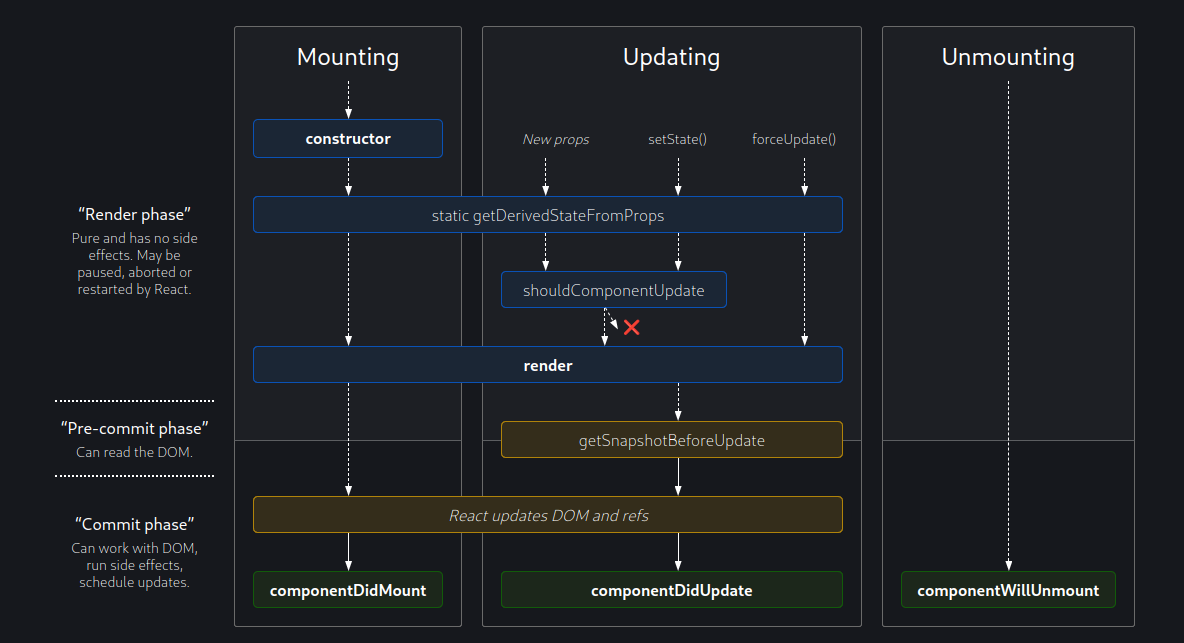
Lifecycle
lifecycle methods https://react.dev/reference/react/Component
- Creation of the component (componentDidMount)
- Render of the component (render)
- (Optional) Update of the component (componentDidUpdate)
- Death of the component (componentWillUnmount)
A render() method has to be pure with no side-effects.
other lifecycle methods
shouldComponentUpdate()
static getDerivedStateFromProps()
https://projects.wojtekmaj.pl/react-lifecycle-methods-diagram/